4/09/2017

3D Universe PLA - Filament Review


Whether you are just beginning with 3D printing or have been doing it for years, 3D Universe is a company that has everything you need.
3d universe filament review

I wanted to try out a new filament to see how it would print with my popular beginner printer, the MP Select Mini.  Most people who are just starting out with 3D printing have questions about what is a good filament to learn to print with.  
For more info you can also watch the video i created where i go into more depth about the filament and clips of it being printed:

3D Universe - PLA - 3D Filament Review


3D Universe send me a roll of their own PLA filament for review.  My goal was to show people specifics about the filament, how it will print, tips for bed adhesion, and the final result of what they can expect.

FILAMENT

This filament is perfect for someone who does a lot of 3D printing and needs a consistent, reliable filament.  This PLA is something that will make repeatable parts under a wide range of settings.
3d universe, pla, filament, cost, buy, ship

3D Universe sells their PLA in several colors.
3d universe website

Big 1Kg roll.
3d universe filament pla review

Here's what it looked like when it came in the mail.
3d universe shipping, cost, how much, how to

how filament is shipped for 3d printer

The filament itself will come wrapped air-tight and look like this.
air tight bag wrap filament

vacuum form plastic bag, 3d print

It came on a large 1 kilogram roll for $30, as opposed to those companies that only sell 750 grams.
3d universe PLA filament

The overall look and feel of the filament is very consistent in size and has that typical matte finish to it.  Like all PLA it is brittle in ductility.  But it has a very nice feel to it.  The filament is tightly wound to the roll.

3D Universe recommends that you print this at 190-210 deg C with a bed temp between 40-60 deg C.  Although they say that it should adhere to a cold bed also.  The advantage of PLA is its characteristic to print well under all different settings.

COMPANY

3D Universe has everything you could ever want for 3D printing.  They sell printers, different brands of filament, software, kits, and more.  
how to print, 3d printer, 3d universe, filament
  
They also sell filament from several different companies.  And they have several years of experience in selling 3D printers, filament, software, kits, etc.
best 3d printer filament

With all the different types of things they sell, they do a very good job of clearly showing each filament and what it looks like.  
where to buy 3d printer filament

3D Universe PLA page.
cheapest PLA to buy

One thing i do wish that they did would be to put the recommended printing temperature right on the roll itself.  Or maybe include a sheet with the filament, with some of the settings to use to get the best prints.  Though they do have that information on the filament website.

TEST PARTS to be PRINTED

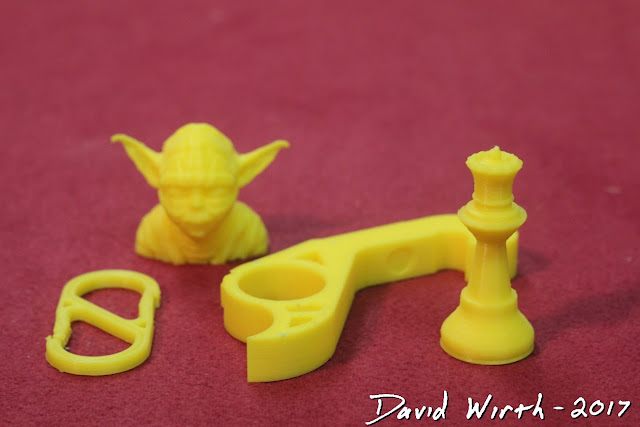
I decided to print 4 test parts, each of which will show a different characteristic of the filament:

1.  Chess Piece - (OVERALL)  This is a good overall part to show how the filament will print.  It has smooth round lines, slight overhangs, and detailed ridges at the top.  If this chess piece prints well in all areas then you can be confident that it will print everything well.

2.  Bottle Opener - (STRENGTH)  I wanted to print the bottle opener to test the filament's strength in a typical, everyday type of part.  See how it reacts to bending, stress, strain, tension, and compression.  Whether the printed part will be rigid or deform when a force is applied to it.

3.  Carribeaner - (DUCTILITY)  Similar to the bottle opener, the carribeaner needs to be strong in tension, but it also needs to bend.  This may be a difficult test for filament like PLA which typically has a rigid characteristic.

4.  Yoda - (DETAIL)  Both of these parts will really require the printer to be able to print in great detail and need to handle tricky overhangs.  The settings for these parts will have to be slowed down to print accurately. 

SETTINGS

Right out of the box this PLA printed super clean.  Any setting changes i made were just minor tweaks to fix small areas of the print.
cheapest PLA

So the settings i used can be thought of a just a general guideline of where to start.  Also i used Cura v15.04.06 because of it's clear and simple settings layout.  For filament that is more difficult to print with, a different slicer program may be needed, and more advanced settings may need to be adjusted.  But for this filament, any base setting on a slicer program will work just fine.

The first thing i do after opening Cura is to import a saved profile for PLA filament, then drag in the part to be printed.  Obviously the 4 different test prints will need to have some settings different from each other.  The Bottle Opener, which is focused on strength, will need a higher infill percentage but can be printed at a faster speed and higher Z axis.  Where as the Chess Piece and Yoda will have little to no infill, but printed slowly for more accuracy.

Basic Settings
cura basic settings

Advanced Settings
cura advanced settings

On their website they have these baseline settings to start off with:
Extruder = 190-210
Bed Temp = 40-60 (but not necessary)
Fan = On

Once the gCode is saved and loaded into the printer we are ready to start printing. 


PRINTING

I like to print directly onto glass with a heated bed, and 90% of the time i use a glue stick to insure adhesion to the glass bed.  You probably don't need to do this, it would work just fine printing onto masking tape, non-heated bed, or hairspray.  I just like my process because i know it works on everything and the part won't lift half way through printing. 
first layer adhesion plate, base

This PLA had great adhesion with the glass and glue stick.
printing on glass using gluestick

I always pay great attention to the first layer, removing any stray filament, and remove any filament that may clump onto the nozzle.  
how to print PLA

Super clean curved lines.
best PLA to print with

Before the printing starts i will manually slow the speed of the print down by roughly half, to ensure that the filament sticks to the print bed.  After the first couple of layers are secure i manually turn the speed up to full.

PARTS

Here's the printed results:
results, review, 3d universe PLA

And here are some close-ups:
how to print, 3d universe PLA

REVIEW

This filament produces some of the cleanest parts i have printed.  When ever i have to print something very detailed, it is the first filament i reach for.  When i wanted to print a scan of my head, their PLA was what i used to create my first print.

I never had any issues with clogging or adhesion.  The individual layers had very crisp lines and corners.  It was not droopy like a PETG and had a very professional finish.

This chess piece printed excellent.  I had no issues with the overhang, detail at the top, or its finish.  The curved lines on the sides were super smooth.
how to 3d print a chess piece

The look of the bottle opener was also super clean and smooth.  The brittle nature of PLA meant that there was no flex in this part, but breaking was not an issue.
great idea for wedding gift

This caribener was very rigid in its tensile strength, but there was some bend that allowed for the hinge point to flex.
free camping gear

And as you would expect, the Yoda head printed super precise.  The detail of this PLA really showed through.  I also had no issues with overhang or sagging.
really cool star wars stuff

FINAL SUMMARY

I'm going to say again, that this is a great filament to start out with, perfect for a beginner.  Even if you don't know everything about settings or have your printer perfectly setup, you can still get great results.  It works great on my entry level 3D printer and should work just as well on any printer you have. 

For someone that prints lots of different types of parts, this is always consistent.  

I have only good things to say about 3D Universe's PLA.  It prints well, vibrant color, great finish, and ultimately produces the most important thing, a great 3d part.  Definitely give it a try.

4/03/2017

ColorFabb nGen - Filament Review


So you are looking at buying a roll of filament to improve the quality of your 3D prints and you're trying to decide what to get.  Take a look at ColorFabb and their new nGen Filament.
colorfabb ngen filament

For a more in depth review you can watch the video i made as well:


colorFabb - NGEN - 3D Filament Review 


https://youtu.be/zk2ZC9rndfY

ColorFabb sent me two rolls of their new nGen filament to review.  I wanted to show people just starting out with 3D printing new types of filament that they can print with and get amazing results.  I wanted to focus on how the filament prints, settings, and the look of the finished 3D part.

You can buy lots of high quality filament from ColorFabb, but nGen is a filament that looks to be perfect for all around situations.
colorfabb printing 3d information how to

Just some of the information they send when you order a roll. 
colorfab ngen 3d printer filament, cost, review

FILAMENT

I feel like the nGen filament is intended for someone who wants to print a very high quality finished part.  When you think about it, people spend loads of time an money on your 3D printer, then go out and buy some cheap lesser quality filament to print with.  I'm convinced that if they tried this ColorFabb nGen filament they might not go back to PLA.
copolyester filament

It comes in several colors, i tested two rolls, which were white and yellow.
best 3d printer filament

Here's what it looked like when it came in the mail.
colorfabb shipping, cost, filament, 3d print

Each roll of filament was also delivered in a smaller box, which had loads of information about the filament.  I think it's great when the company doesn't just send you a roll and say "here".  It's nice when they say "we've tested this, we recommend you print at this temp and at this speed to get the best results".

Really well packaged.
color fabb ngen filament

Filament type and printing temps on the side of the box.
color fabb ngen printing temperature setting

Double plastic wrap for air-tightness.
filament storage, 3d print

Printing information on the back of the box.
basic 3d printing settings

Close-up of the side of the box.
colorfabb ngen white

You can see that they give the color, size, and printing temp range.
colorfabb ngen yellow, cost, price, shipping

And here's what it looked like wrapped in an air-tight bag.
colorfabb review, colorfab, ngen, result, quality

Another view of the 2 colors of filament.
best 3d filament

It comes on a clear spool which is great for seeing how much filament you have left to print with.  They also put the printing temps right on the roll which is great to have as well.  Every company needs to do this.
ngen information, printing, temp

And again the printing temperature range is printed right on the roll, which is super convenient.
colorfabb printing temps

The overall look and feel of the filament is not like any other filament i've seen.  It's very pliable and bendy, yet it has a shiny surface.  It isn't like a PLA or PETG.  However they recommend that you print with the extruder set between 220 and 240 degrees C, so i think the filament is probably closest to a PETG.  They also recommend that you use a heated bed set at 70 to 80 degrees C, which is also similar to a PETG.


COMPANY

You can tell from looking at their website that ColorFabb has their *bleep* together.  They sell all different kinds of filament and have loads of support and information about them.
colorfabb webpage, information

Here's their nGen page, which has several colors to pick from.
ngen colorfabb color information, how to print

Their filament product page clearly shows what you are buying and settings for printing.
best color to print with, 3d print

From their website to their shipping box to their filament, everything has a feeling of high quality.


TEST PARTS to be PRINTED

I decided to print 4 test parts, each of which will show a different characteristic of the filament:

1.  Chess Piece - (OVERALL)  This is a good overall part to show how the filament will print.  It has smooth round lines, slight overhangs, and detailed ridges at the top.  If this chess piece prints well in all areas then you can be confident that it will print everything well.

2.  Bottle Opener - (STRENGTH)  I wanted to print the bottle opener to test the filament's strength in a typical, everyday type of part.  See how it reacts to bending, stress, strain, tension, and compression.  Whether the printed part will be rigid or deform when a force is applied to it.

3.  Carabiner - (DUCTILITY)  Similar to the bottle opener, the carabiner needs to be strong in tension, but it also needs to bend.  This may be a difficult test for filament like PLA which typically has a rigid characteristic.

4.  Yoda - (DETAIL)  Both of these parts will really require the printer to be able to print in great detail and need to handle tricky overhangs.  The settings for these parts will have to be slowed down to print accurately.


SETTINGS

I printed a few small objects to get a feel for how the filament prints.  The small parts came out really well, but one thing that stood out was that if the hot end pauses during printing, there is some oozing of the filament, similar to a PETG.
3d print test print

You can see that there were small blobs on my very first prints using a PLA baseline setting, which is mainly an issue with my very basic MP Select Mini printer.  It did not make a smooth arc, but instead paused at that point in the curve.  Again, not a fault of the filament, but adjustments that needed to be made in the Cura settings.
3d print blobs, results

So i thought a good starting point for settings would be to import a baseline PETG setting.  I used Cura v15.04.06 because of it's clear and simple settings layout.  I also tried creating the gCode with the newer version of Cura and Simplify 3D, but i didn't see much of a difference.

You can see that the detailed areas came out very good, even at the large 0.3mm layer height.
colorfabb detail print

Once you set the extruder temp and heated bed temp that ColorFabb suggests, the most important settings for nGen is speed and retraction.  I've found that for corners or with detailed prints, if i slowed down the speed it printed very well.  Also i tweaked the retraction speed and retraction distance to get rid of the above mentioned blobs when the printer paused.
ngen test print, 3d printer, cube

Again this only happens on certain parts and is probably an issue with my cheap printer.  But by increasing the retraction speed and distance i could get the oozing to go away.  I probably could have lowered the extruder temp as well to lessen the oozing.

Now obviously the 4 different test prints will need to have some settings different from each other.  The Bottle Opener, which is focused on strength, will need a higher infill percentage but can be printed at a faster speed and higher Z axis.  Where as the Chess Piece and Yoda will have little to no infill, but printed slowly for more accuracy.

There are no specific suggestions for printing with their nGen, but the following is a good baseline to start with:

Basic Settings
cura basic settings, cura version, update

Advanced Settings
advanced 3d print settings, cura

Once the gCode is saved and loaded into the printer we are ready to start printing.


PRINTING

I like to print directly onto glass with a heated bed and 90% of the time i use a glue stick to insure adhesion to the glass bed.  They recommend that the heated bed be set around 75 degrees C, but i've found that it sticks very well at any temp above 50 degrees C.

I always pay great attention to the first layer, removing any stray filament, and remove any filament that may clump onto the nozzle.
3d filament first layer

Before the printing starts i will manually slow the speed of the print down by roughly half, to ensure that the filament sticks to the print bed.  After the first couple of layers are secure i manually turn the speed up to full.

Again with the high strength and bendability of this filament, it made for great structural parts for the printer.  I was not at all afraid of these clips and belt tensioners of breaking, like a basic PLA might.
hardware for 3d printer, how to print

PARTS

Here's the printed results:
results of filament from colorfabb ngen


filament parts, detail, strength

how to 3d print


best things to print with 3d printer

And here are some close-ups:

These were printed after the white.  You can see how well the chess piece turned out after the retraction was set correctly in Cura.
cool things to print with 3d printer

Notice how smooth the bottle opener printed once i had the settings dialed in.
what can i print with 3d printer


REVIEW

This is one of the nicest filaments i've ever printed with.  If i had to give one description of it, i would say "buttery-smooth".  The filament printed very easily and the parts came out with one layer blending into the next.  Even with a beginner printer like mine, the 3D parts came out looking like they were printed on a much more expensive machine.  There was no adhesion issues with my glass print bed and it was very forgiving with the majority of settings.  Once you have the speed and retraction dialed in, it prints great.  And although it was printing around 230 degrees C i did not have any issues with drooping or sagging during the prints.

As mentioned above my first baseline print of the chess piece came out with some blobs where my printer paused as it raised up the 0.3mm layer height.  After adjusting the settings i was able to get a nice smoother finish.
colorfabb ngen white chess piece, 3d print

On this piece you can see that it has a super smooth finish on the curved edges.  And as far as the overhang and detail at the top...this filament printed very well.
3d print chess piece, custom

I had no problem printing the bottle opener.  All the lines came out very clean and had zero issues with any imperfections.
bachelors gift, bottle opener, 3d print

The filament itself was incredibly strong.  There was some bend to it but it showed no signs of breaking.
cool free bottle opener, great bachelors party gift

Again for the caribener this filament was excellent in its ductility and strength. 
3d printed camping equipment, caribener

Not rigid like a PLA, the nGen was able to bend and spring at the flex point, yet showed tensile strength.
cool camping clip

Even at 0.3mm layer height the Yoda heads came out excellent.  
star wars, yoda, 3d printed part

There was no droopyness while printing the ears and there was loads of detail in and around the face.  
how to 3d print star wars


Final Summary

I do have to say that at 36 Euro there are cheaper filaments out there.  But in this case you totally get what you pay for.  ColorFabb's nGen filament is something you want to use when you are printing a part to show off or for a professional part.  Ya you can screw around with cheap PLA for little printed things you don't care about, but when you want it to look perfect, nGen is the way to go.  So if you are a beginner 3D printer that is looking to take the next step in 3D printing, ColorFabb's nGen is something you should give a try.

If you've ever printed with nGen filament let me know what you think.  I bet that you've had the same experience that i've had.  And if you haven't tried this filament you definitely should.

Visit ColorFabb to buy a roll.